• Skip to content
  • Skip to primary sidebar

Header Right

  • Home
  • About
  • Contact

Are You Tracking Absolutely All of Your Tax-Related Business Expenses?

January 18, 2022 by Admin

If you’re self-employed, understanding what’s deductible and recording all of your business expenses should be priorities.

When you work for yourself, accurate accounting is critical. The IRS pays special attention to tax returns prepared by sole proprietors. Not only does the agency try to determine whether all taxable income has been recorded, but they also scrutinize business expenses that are claimed, since some taxpayers blur the lines between personal and business purchases.

We’re not suggesting you hold anything back when you’re tracking your tax-deductible business expenses. We want you to claim every penny that the IRS says is permissible. This is especially important if your company makes a lot of money. You’ll need to document everything you can to offset your income and minimize your tax obligation.

How do you ensure that all of the money you’re spending to make money ends up somewhere on your IRS Schedule C? Let’s look at steps you can take.

Review the Schedule C

tax tips

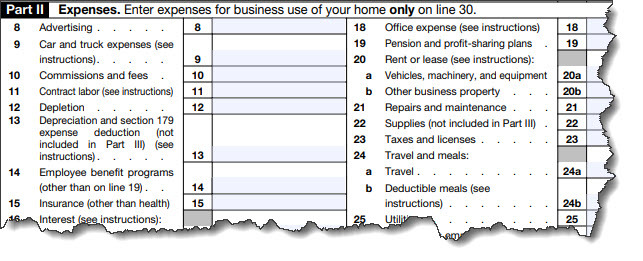
The actual IRS Schedule C form contains broad expense categories. You may need to dig into deeper explanations of them.

If you’ve never completed a Schedule C before, it’s especially important that you familiarize yourself with it. You can view a copy of the 2020 version here. Pay special attention to Part II Expenses. The form breaks down business expenses into specific categories. But what’s the difference between Office expenses and Supplies? What does Other business property mean? Not only do you have to know which expenses are deductible, but you must be sure to include them in the right category.

The IRS has a special publication devoted to discussion of deductible business expenses. You’ll find links to it here. It’s a lengthy document, but there’s an interactive table of contents that lets you jump right to the section you want. You don’t have to read the whole thing, but you might bookmark it so you can consult it when you have a question. There are many questions on the Schedule C that may require additional explanation.

You might want to visit the IRS instructions online. This page displays a detailed outline of the form, section by section and line by line, so you can find what you’re looking for easily and click a link to get there.

Keep Detailed Records

This will be challenging if you’re doing your bookkeeping manually. You’ll need to set up a system of folders or envelopes or whatever works for you and separate receipts by either month or Schedule C category. If you know your way around Excel, you could set up a spreadsheet divided by category and enter receipt information as it comes in. This will make calculations easier, too.

Do make notes on your receipts so you’ll know why you thought the purchases would be deductible. You might also indicate whether the receipt was already entered in your master list, so you don’t have duplicate entries. Don’t forget about credit card charges and checks you’ve written for tax-deductible purchases that didn’t generate a receipt. Enter them in your master list as you go. If you’re ever audited, you’ll need copies of them for documentation. If you get electronic receipts in email, save them in a folder on your computer and record them.

tax tips

You can categorize your tax-related business expenses using personal finance or accounting applications.

There are numerous personal finance and small business accounting applications that allow you to import your online banking transactions and categorize them. These include QuickBooks (online and desktop), Mint, Quicken, and Simplifi by Quicken. Their category lists can often be modified, so you can make sure your tax-related expenses are organized accurately.

Don’t Dismiss the Unusual

There are some legitimate tax deductions that the IRS doesn’t necessarily include in the Schedule C instructions, but which it will accept. For example, H&R Block reported on a case where the cost of cat food was considered a business deduction (a scrapyard was trying to attract wild cats to keep snakes away). A professional bodybuilder was able to claim his purchase of ProTan Muscle Juice Professional Posing Oil as an acceptable business expense.

We’re not recommending that you spend a great deal of time looking for obscure tax deductions. But think about your purchases as you make them to see if they’re tax-worthy.

All of these suggestions may sound time-consuming. They can be, until you get into the habit of tracking all of your tax-related business expenses, but it does require constant diligence. We can help ensure that you’re only claiming legitimate deductions and advise you on those you might question. We can also prepare and file your return for you and/or help with year-round tax planning. Contact us for a consultation.

Filed Under: Taxes

5 Topics Every Business Owner Should Discuss with An Accountant

December 20, 2021 by Admin

MeetingYour accountant or CPA is a business asset that you should put to good use year-round, not just at tax time. There are several topics beyond taxes that business owners should discuss with their trusted financial professionals. In this article, we cover five of them for you. While the new year is traditionally when business owners think of making financial, strategic, and other business-related plans, any time is the right time to speak to your accountant to discuss the following aspects of your business. You can’t begin the conversation too early, but it could be too late in some cases, so don’t put aside these five essential talking points.

1. Financial Planning

Budget is front of mind for business owners, but other financial issues impact your business, too. Consider a full portfolio review with your accountant to plan your financial future. Some critical topics to cover include strategies to improve cash flow, existing business loans, capital investment, charitable contributions, employee-related expenses like bonuses and health care, retirement planning, and asset management.

2. Company Growth

The goal of all businesses is growth. With growth comes change. As your business objectives shift, your valuation and tax liability often shift, too. Any changes you experience in your business should be conveyed to your accountant or CPA so that they can apprise you of liabilities or status changes. For example, suppose you plan to expand, add additional locations, make significant staffing changes, merge companies, acquire new businesses, or plan to sell your business. In that case, you should set up an appointment with your accountant to develop a logical strategy to address the change.

3. Inventory

If your business sells or resells tangible goods, inventory is vital. Sales tax laws and regulations can be challenging. Many states have rules about nexus (i.e., how much presence a business has in a city or state) related to where businesses warehouse inventory and fulfill orders. Your accountant can assess your order process to verify your restocking and ordering processes to maximize cash flow, ensure unsold inventory is accounted for, and ensure that sales tax is collected everywhere your company has nexus.

4. Risk Management

Do you have a plan in place to protect your business from disruption? Many do not. If that applies to your business, contact your accountant to discuss continuity planning to protect your business. They can provide professional insight regarding how to mitigate risks should a disruption occur. Some topics to address are whether your insurance policies are up to date, if all compliance, security, and privacy standards are met, whether your business has fraud protection in place, and if the existing internal controls protect your business. Given the time and capital small business owners invest in their passion, they must take time to manage any potential risk that could destroy what they worked so hard to create and build.

5. Tax Compliance

Lastly, as a business owner, you always want to be tax compliant. And this doesn’t apply only to federal taxes. It is just as essential to make sure state-imposed taxes are addressed on time. Regulations and tax laws change frequently, so it is vital to have a firm grasp on these. The best way to ensure you do this is to have your accountant guide you. They can inform you of any changes that affect your business and advise you on addressing them. Discuss collecting and filing W2s and 1099s for any contract employees; ensure exemption and resale certifications are collected and stored correctly; comply with online sales and nexus rules; and have an internal review to find any issues that might trigger a sale tax audit.


It helps to think of your business accountant as an extension of your team, an impartial adviser who will assess the risks and rewards associated with your business. They will answer your questions and illuminate unclear topics for you. They may bring up important points you’ve yet to consider, so make that call today and get a meeting on the calendar to discuss these critical points with your accountant. And remember, you can do your part by making sure you keep business and personal finances separate and maintaining complete, organized records.

Filed Under: Best Business Practices

Customers Paying Late? How to Create Statements

November 20, 2021 by Admin

There are many ways to encourage delinquent customers to pay. QuickBooks Online’s statements may be effective for you.

After the year-plus you’ve just experienced, the last thing your small business needs is customers who are behind on their payments to you. You may have been giving them a break because you know that they’re struggling, too, but things have been looking up for many companies in the past few months. It’s time for you to be more proactive about calling in your debts.

There are numerous ways you can accomplish this. One of the best is to send statements in QuickBooks Online, which are detailed reminder forms that contain multiple transactions. These can be especially helpful if you’ve sent multiple invoices with no response. There are three different types you can send, depending on your needs. Here’s how you create them.

Before You Start

QuickBooks Online offers a couple of options for formatting your statements. To see these, click the gear icon in the upper right corner and select Your Company | Account and Settings. Click the Sales tab and scroll down to the Statements section. Click the pencil icon over to the far right to make any changes needed. You can:

  • List each transaction as a single line or include all of the detail lines.
  • Display an aging table at the bottom of each statement.

Click the buttons to specify your preference and then click Save and Done.

Three Statement Types

You can choose from among three different types of statements in QuickBooks Online: Balance Forward includes invoices with outstanding balances for a specified range of dates. Open Item statements contain information about all unpaid (open) invoices from the last 365 days. And Transaction Statements show every transaction in a date range that you specify. We’ll describe how to create them so you can decide which makes the most sense for a particular situation.

One Way to Create Statements

Like it does for many other actions, QuickBooks Online offers two ways to create statements. The first is easier. Click the New button in the upper left and select Statement (under Other). Click the down arrow in the field under Statement Type to see the three options there.

If you select Balance Forward, you’ll need to define three criteria (there will be similar options for the other two types):<.p>

  • Statement Date
  • Customer Balance Status (Open, Overdue, or All)
  • Start Date and End Date

When you’re satisfied with your statement parameters, click Apply. QuickBooks Online will display a list of the transactions that meet your criteria, along with the number of them that will be generated. Each row in the list will display the recipient’s name, email address, and balance. In the upper right corner, you’ll see the number of statements again and the total balance these customers represent.

If you want to exclude any of these customers, click in the box in front of each to unselect them and delete the checkmark. When you’re satisfied with your list, click Save, Save and send, or Save and close. If you click Save and send, a window will open containing a preview of your statements. Thumbnails of each will appear in the left pane. Click on any to see their previews. When you’re ready, you can download, print, or send them.

If you click Save or Save and close, you’ll still be able to see the statements you’ve just generated. Click the Sales tab in the toolbar, then All Sales. Click the down arrow next to Filter and open the drop-down list under Type. Select Statements, and your list will appear. You can print or send one by selecting the correct option in the Action column. If you want to dispatch multiple statements, click in the box in front of each, and then click the down arrow next to Batch actions.

Another Method

There’s an alternate way to create statements. Click the Sales tab in the toolbar, then Customers. Select any or all of the customers in the list, then click the down arrow next to Batch actions and select Create statements. QuickBooks Online will open the Create Statements window again so you can select the type and process your statements like you did using the previous method.

We don’t expect that you’ll have much trouble working with statements, though you may want to consult with us on when they’re appropriate. We can also suggest other ways to bring your accounts receivable up to date. As always, we’re available to help you maximize and streamline your use of QuickBooks Online. Keeping your financial books current and organized is one way to ensure that you don’t fall too far behind with customer payments.

Filed Under: Quickbooks

5 Common (and Costly) Payroll Errors and How to Avoid Making Them

October 20, 2021 by Admin

Payroll is one of the most important aspects of any business, but it’s one that, when running smoothly, business owners don’t tend to think about; however, when there’s a payroll glitch, it jumps to the forefront of an owner’s mind. Here are several payroll mistakes that can cost you a bundle and how to avoid them in your business.

1. Misclassifying Employees

How you classify employees when you hire them impacts how you and your employees are taxed. If you hire an office staffer to answer phones and file paperwork for an hourly wage, that is a non-exempt employee. Alternatively, if you employ an individual as a salaried Head of Operations, they are exempt. The main difference is that non-exempt employees are eligible to receive overtime pay; exempt employees are not.

There is also a distinction between employee, freelancer, and contractor. An employee receives a regular wage, while freelancers and contractors are typically paid per project. Misclassifying employees may not seem like a big deal at first, but in time, the IRS will find out, and your business will end up paying the taxes due, the associated fines, and of course, the interest on the past-due taxes.

To avoid this issue, understand the classifications and the capacity in which you hire your employees. To classify employees, be sure to use IRS definitions. For example, the IRS defines independent contractors this way: “the general rule is that an individual is an independent contractor if the payer has the right to control or direct only the result of the work and not what will be done and how it will be done.”

2. Miscalculating Pay

There are many payroll aspects to consider, such as overtime, commissions, deductions, paid time off (PTO), and more. When it comes to calculating pay, payroll admins should keep in mind that different policies apply to each state, and that must also be considered. For example, the federal overtime law dictates that overtime wages (pay for hours worked over 40 hours in a workweek) are paid at 1.5 times the employee’s regular hourly rate. However, some states have different policies regarding overtime. For example, in Alaska, California, Colorado, and Nevada, overtime is also based on hours worked in a day. As a general rule, a business should comply with the more generous law for the employee.

In addition to overtime pay miscalculations, poor time tracking capabilities also contribute to miscalculated pay. To avoid an issue miscalculating pay, be sure to know your state’s guidelines on overtime pay. Further, be sure that your company has a reliable tracking system for keeping up with employee hours so that pay, overtime, and other payroll aspects like PTO are correctly recorded and calculated. This process will significantly reduce the chance of payroll overpayment or underpayment mistakes that could become costly payroll corrections.

3. Missing Deadlines

One of the most damaging payroll mistakes for a business is missing payroll tax deadlines. Missed deadlines can cost thousands of dollars in penalties, and in extreme cases, a company’s business license can be suspended.

To avoid this critical error, use the IRS Calendar Connector to help you remember your tax deadlines. However, if you miss a tax deadline, contact the tax agency immediately because late payment penalties pile up quickly. The quicker you get in touch with the IRS, the lesser penalty you will have to pay.

4. Messy Recordkeeping

What is the word a small business owner least likes to hear? There are likely a few, but “audit” has to be right at the top of the list. The anxiety that term induces should be reason enough to keep accurate, complete payroll records that are well-organized. The price you pay for not doing that could be fines, penalties, and a plethora of costly payroll-related tax issues. For example, if you accidentally file W-2 forms late, you will pay between $50 and $260 in fines depending upon how late the W-2s are filed.

The same goes for late-filed 1099 forms or any other tax-related documentation. The fines vary. For example, if you do not provide a contract employee with a 1099 form, that’s a $250 fine.

To avoid this issue, keep accurate, complete, up-to-date payroll records for all employees. Mind your paperwork like W-2 forms, timesheets, 1099 forms, and pay records. Also, be sure to retain employee records for the four-year minimum that the IRS requires after an employee leaves your company. FYI: The SBA recommends retaining payroll records for six years.

5. Missed Tax Forms

An extension of point four above targets the end-of-year task that some payroll admins dread – preparing and sending all the necessary tax forms to all employees, whether they are full-time (W-2), part-time (W-2), or independent contractors (1099). Remember, form 1099 is required to be sent to an independent contractor who earned $600 or more during a tax year.

To avoid this issue, make sure tax rates are in order, payroll is correctly calculated, and all forms are correctly filled out and sent to employees promptly.


Payroll-related tax issues are avoidable. Take time to speak to your trusted tax preparer or CPA today so that you avoid these mistakes and keep your business running as it should.

Filed Under: Best Business Practices

How to Create Estimates in QuickBooks Online

September 20, 2021 by Admin

Whether you sell products or services, you may need to create estimates in QuickBooks Online. Here’s how it’s done.

It would be nice if you could just instantly invoice every sale. But sometimes your customers need to know what a particular purchase will cost before they make the decision to buy. So you need to know how to create an estimate. If the sale goes through, you’ll of course want to send an invoice.

QuickBooks Online automates this entire process. It even helps you track the progress of your estimates by providing a special report. Here’s how it works.

Just Like An Invoice – Almost

The process of creating an estimate in QuickBooks Online is almost identical to creating an invoice. You click the New button in the upper left and select Estimate.

QuickBooks tips

Creating an estimate in QuickBooks Online is like creating an invoice, with a few differences.

When the form opens, you’ll notice one difference right away. Directly below the Customer field, you’ll see the word Pending next to a small down arrow. Click it to see what your options are here. You’ll be able to update its status later. Select a Customer to get started. If this is a new customer, click + Add New and enter at least the name. If you want to build a more complete profile at this point, click Details and complete the fields in the window that opens. To send a carbon copy or blind copy of the estimate to someone else, click the Cc/Bcc link.

Next to the Estimate date, there’s a field for Expiration date. Enter that and continue on to add the products and/or services that will be included, just as you would on an invoice. If you’re generating an estimate for a new product or service, click + Add new in the drop-down list. A panel will slide out from the right that allows you to create one.

You’ll see more options for your estimate at the bottom of the page. You can add a message in the message box (or leave the default message if there is one). You can also Customize it, Make recurring, or Print or Preview it. When you’re satisfied, Save it, and send it to the customer.

Updating the Status

Your estimate will not be considered a transaction until you accept it. To do this, click the Sales link in the toolbar, then All Sales. Find your estimate in the list by looking in the Type column. Click the down arow next to Create invoice to see your other options there. You’ll see that you can Print or Send it or save a Copy.

Click Update status. In the window that opens, click the down arow next to Pending. From the list that drops down, select Accepted. You can also mark it Closed or Rejected. If you choose any of the last three options, another window opens that allows you to enter the name of the individual who authorized the action and the date it was done.

Click Create invoice if your estimate was accepted. You’ll have three options here. You can invoice your customer for:

  • The estimate total.
  • A percentage of each line item.
  • A custom amount for each line.

After you’ve made your selection, click Create invoice to open the form with the amounts filled in based on your preference. Complete anything that’s unfinished but do not change any of the product or service line items. Save it, and your invoice is ready to go. You can always check the status of your estimates by running the Estimates by Customer report.

Creating and tracking estimates is as easy as working with invoices. You may run into difficulties, though, if you need to do anything beyond that point with estimates, such as modifying it and re-submitting them. We’re here to answer any questions you might have about this. It’s important that you get your estimates and their subsequent invoices exactly right, so you don’t lose money or sales. Let us know if you want to go over these concepts.

Call 702-658-9535 now or request a free initial consultation online to learn more about our QuickBooks accounting services listed below.

Filed Under: Quickbooks

7 Small Business Tax Credits You Should Know About for 2021

August 23, 2021 by Admin

Notebook with tax credit  sign on a table. Business concept.Small businesses benefit from various tax credits that reduce the amount of tax they pay to the government. Here, we discuss tax credits, why they exist and provide a list of the top tax credits that small business owners should know.

Small Business Tax Credits

A small business tax credit is an amount of money subtracted from the taxes the business owes. Tax credits differ from tax deductions. For example, deductions cut a business’ total tax by a percentage of the deduction, depending on the tax bracket. Alternatively, tax credits reduce the tax due, not the amount of taxable income. In other words, a small business tax credit is a dollar for dollar deal – every dollar of credit cuts the business’ tax by a whole dollar. This credit is a significant benefit for small business owners because it helps recover some operating costs and retains the precious capital needed for growth.

As a practical example, if your business owes $20,000 in taxes, but you can claim a $5,000 tax credit, that amount is subtracted from your total tax bill making the new tax bill $15,000.

The Purpose of Small Business Tax Credits

The U.S. government grants tax credits to promote behaviors it finds favorable. For example, tax credits are offered to businesses as incentives for activities that benefit employees, promote specific industries, or aid or benefit society. One example is the government offering tax credits to businesses that purchase electric vehicles. The government encourages this to fight climate change and global warming. Because tax credits can have such a dramatic impact on a small business’s bottom line, it is crucial to stay apprised of tax credits for which your business is eligible.

7 Small Business Tax Credits for 2021

In the wake of the COVID-19 pandemic, related tax credits for small businesses top the list.

1. Employee Retention Credit

Under the American Rescue Plan, the Employee Retention Credit (ERC) is extended for small businesses through December 2021 and is available for all four quarters of the year. This tax credit allows small businesses to offset payroll tax liabilities by up to $7,000 per employee per quarter. That means a credit of up to $28,000 per employee is available for small businesses whose revenue declined due to the COVID-19 pandemic. A 20 percent decline in gross receipts during a single quarter makes a business eligible for this tax credit.

2. Paid Leave Credit

Another tax credit that falls under the American Rescue Plan is the Paid Leave Credit. This credit is extended through September 30, 2021, and offers credits for small and midsize businesses that offer paid leave to employees for COVID-related illness, quarantine, or family caregiving. The allowable credit is equal to wages up to $5,000 of paid leave for sick or quarantining employees.

Note: Small businesses are no longer required by law to offer paid leave related to COVID; however, if they do, the credit still applies.

Other tax credits of which small businesses should be aware are:

3. Health Care Tax Credit

With the Health Care Tax Credit, the smaller the business, the bigger the credit. The credit is highest for businesses with fewer than ten employees. Generally, the way to qualify for the credit is by enrolling in a Small Business Health Options Program (SHOP).

A business must meet the following requirements to qualify:

  • (a) have fewer than 25 full-time employees,
  • (b) have an average employee salary of approximately $50,000 per year or less,
  • (c) pay at least 50 percent of full-time employees’ healthcare premiums, and
  • (d) offer SHOP coverage to all full-time employees.

This credit can be claimed for two consecutive years, applicable from 2017 forward.

4. Work Opportunity Credit

This credit is available to employers who hire from specific groups that face barriers to employment. For example:

  • Qualified IV-A Recipient – receiving TANF assistance
  • Qualified Veteran – the IRS provides details of what “qualified” entails on their site under Tax Credits
  • Ex-Felon
  • Designated Community Resident (DCR) – between 18 and 40 years old and living in an empowerment zone, an enterprise community, or a renewal community
  • Vocational Rehabilitation Referral – a person who has a physical or mental disability and has been referred to the employer while receiving or upon completion of rehabilitative services
  • Summer Youth Employee
  • Supplemental Nutrition Assistance Program (SNAP) Recipient
  • Supplemental Security Income (SSI) Recipient
  • Long-Term Family Assistance Recipient
  • Qualified Long-Term Unemployment Recipient

Under the Consolidated Appropriation Act, 2021, this credit was extended until December 31, 2025.

5. Disabled Access Credit

Eligible small businesses that earn $1 million or less and have a maximum of 30 full-time employees in a year can claim this credit each year in which expenditures are incurred to make their business accessible to persons with disabilities under the Americans with Disabilities Act (ADA).

Expenditures include, but are not limited to, installing wheelchair ramps, upgrading restrooms, and providing Braille text materials.

6. Employer-Provided Childcare Facilities and Services

While few businesses these days seem to provide in-house child care for their employees’ children, a tax credit can make this an attractive option. This credit is a general business tax credit for 25 percent of qualified employer-provided child care expenditures plus 10 percent of qualified child care resources and referral expenditures. The credit is capped at $150,000 per tax year.

Qualifying expenditures:

  • Include operating costs of a qualified child care facility
  • Include costs for acquisition, construction, rehabilitation, or expansion of a property used as a care facility (but not land or any part of the principal residence of the taxpayer)
  • May not exceed the fair market value of care provided

The employer-run facility must open enrollment to employees and must not discriminate in favor of highly compensated employees. At least 30 percent of the facility’s enrollment must consist of dependents of taxpayer employees.

7. Research and Development (R&D) Tax Credits

Several R&D tax credits exist for small businesses. These credits typically apply to science, medical and technology-based businesses; however, many businesses engage in qualified R&D activity.

The following activities qualify for an R&D tax credit:

  • New prototype or model development
  • Proprietary product on which you seek a patent
  • Developing a new manufacturing process or business process
  • Improving product efficiency or existing business processes
  • Improving quality control processes
  • Environmental or certification testing

Businesses that qualify for this credit can subtract up to 10 percent of R&D costs from their tax bill.


Ask your tax professional about small business tax credits that apply to your business. There are additional federal small-business tax credits from state and local governments. Tax credits often expire after a few years, so act quickly to take advantage of those that apply to you.

We offer a variety of tax planning services to both businesses and individuals. Conscientious tax planning throughout the year can save you money and make tax time easier. Call us at 702-658-9535 and request a free initial consultation to learn more.

Filed Under: Business Owners, Small Business, Taxes

  • « Previous Page
  • Page 1
  • …
  • Page 7
  • Page 8
  • Page 9
  • Page 10
  • Page 11
  • …
  • Page 15
  • Next Page »

Primary Sidebar

Search

Archive

  • January 2026
  • December 2025
  • November 2025
  • October 2025
  • September 2025
  • August 2025
  • July 2025
  • June 2025
  • May 2025
  • April 2025
  • March 2025
  • February 2025
  • January 2025
  • December 2024
  • November 2024
  • October 2024
  • September 2024
  • August 2024
  • July 2024
  • June 2024
  • May 2024
  • April 2024
  • March 2024
  • February 2024
  • January 2024
  • December 2023
  • November 2023
  • October 2023
  • September 2023
  • August 2023
  • July 2023
  • June 2023
  • May 2023
  • April 2023
  • March 2023
  • February 2023
  • January 2023
  • December 2022
  • November 2022
  • October 2022
  • September 2022
  • August 2022
  • July 2022
  • June 2022
  • May 2022
  • April 2022
  • March 2022
  • February 2022
  • January 2022
  • December 2021
  • November 2021
  • October 2021
  • September 2021
  • August 2021
  • July 2021
  • June 2021
  • March 2021
  • February 2021
  • January 2021
  • December 2020
  • November 2020
  • October 2020
  • September 2020
  • August 2020
  • July 2020
  • June 2020
  • May 2020
  • April 2020
  • March 2020
  • February 2020
  • January 2020
  • December 2019
  • November 2019
  • October 2019
  • September 2019
  • August 2019
  • July 2019
  • June 2019
  • February 2019
  • January 2019
  • December 2018

Category

  • Best Business Practices
  • Business Owners
  • Estate and Trusts
  • Financial Advising
  • Investments
  • Quickbooks
  • Real Estate
  • Retirement
  • Small Business
  • Taxes
  • Uncategorized

Copyright © 2021 · https://www.jwenterprisesllc.com/blog